When AI results are unstable, check the setup around the model before switching models. That setup is called the "harness." Split it into five parts: instructions, the information passed in, the tools it can use, how results are checked, and records. Then find which part one failed case went wrong in. Fix that part first.
What can AI realistically do here today?
When AI is built into work or a service, the model is not working alone. The program around it decides what to instruct, which information to pass in, which tools to allow, and how to check the result.
Anthropic, an AI provider, puts it this way in its engineering posts (both in English, checked on November 10, 2026):
- Even with the same model, performance on software engineering tasks can vary significantly depending on the setup around it (post of January 6, 2025; provider statement).
- When you evaluate an AI agent, you are evaluating the harness and the model working together (post of January 9, 2026; provider statement).
These are the provider's statements, and we have not verified them independently. Still, one point can be checked in your own setup: if you suspect only the model when results are poor, you can miss the part that needs fixing.
The five parts of a harness
A harness is easier to check when you split it into these five parts.
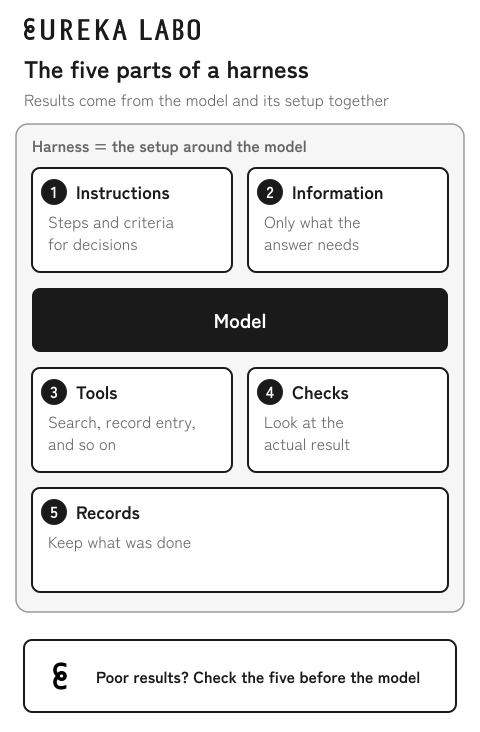
If the table does not fit, scroll it sideways.
| Part | Role | When it is weak | First check |
|---|---|---|---|
| 1 Instructions | Give the steps and the criteria for decisions | Answers vary with how each person reads them | Could a new team member read them and decide the same way? |
| 2 Information passed in | Pass in the material the answer needs | Old or unrelated material pulls the answer off course | Is the needed material in, and the unneeded material out? |
| 3 Tools it can use | Let it use functions such as search or record entry | It misuses a tool and repeats the same mistake | Are the tool descriptions and input formats hard to get wrong? |
| 4 How results are checked | See whether the result is right | A report of "done" is enough to pass | Are you looking at the actual result, not the report? |
| 5 Records | Keep what was done and hand it to the next run | The cause of a failure cannot be traced later | Are the input, the tools used, and the answer kept? |
The provider also gives concrete examples for the second and third parts (checked on November 10, 2026):
- Information passed in must be treated as a finite resource. As the amount grows, the model's ability to accurately recall information from it decreases (post of September 29, 2025; provider statement).
- When building an AI for software engineering tasks, they spent more time optimizing the tools than the overall prompt. The model made mistakes with relative file paths, so they changed the tool to always require absolute file paths (post of December 19, 2024; provider statement. The post notes that much of the tooling landscape it describes has changed since December 2024).
Where to start? Two tasks for today
Task 1: List your current setup as five parts
For the AI setup you use, write one line per part on how it works now. For example: "Instructions: one request asking for a draft reply to inquiries," "Records: only the final answer is kept."
If there is a part you cannot write down, check it first. A part whose contents no one knows cannot be fixed when results get worse.
Task 2: Sort one failed case
Pick one recent case that went wrong, and check it from the top.
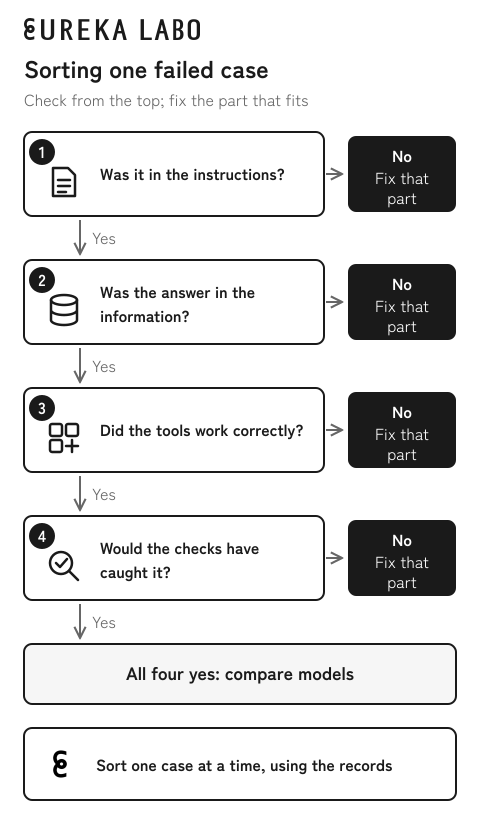
Compare models only when no cause turns up in the instructions, the information, the tools, or the checks. What to check when switching models is covered in "Four Things to Check Before Switching a Production App to a New AI Model."
What must a person check?
Even after fixing a part, a person checks these three things:
- Look at the actual result, not the AI's report of "done." For example, in explaining how to evaluate AI agents, the provider notes that a flight-booking agent might say "Your flight has been booked," but the outcome that counts is whether the reservation actually exists in the database (post of January 9, 2026; provider statement).
- Whether the records let you trace it later. Check that the input, the tools used, and the answer can be followed case by case.
- After changing a part, run the failed case and the cases that used to work through it again.
Who approves what, and how much to keep in the records, depends on the data and the work involved. This section only shows where to start checking.
The pitfall: changing several parts at once
The pitfall to avoid most is changing the instructions, the information, and the tools all at once because results are poor.
Whether things get better or worse, no one can tell which change worked. The next time the same problem appears, there is nothing to go back to.
Change one part at a time, and each time, run the failed case and the cases that used to work through it again. Keep a record of what was changed.
When it is time to fix the setup
How instructions, information, tools, checks, and records are built depends on the systems you connect, the data you handle, and the steps of the work. Rebuilding the parts the check points to, on the system side, is development work.
Eureka Labo's software development covers everything from contract development to FDE (embedded, side-by-side development). For the AI features in a service you already run, you can ask us about rebuilding the parts the check turned up.
When you contact us, please leave out confidential information and send the list from Task 1 and a description of the failed case (with personal and confidential details removed). We will discuss what we can take on after reviewing the details.