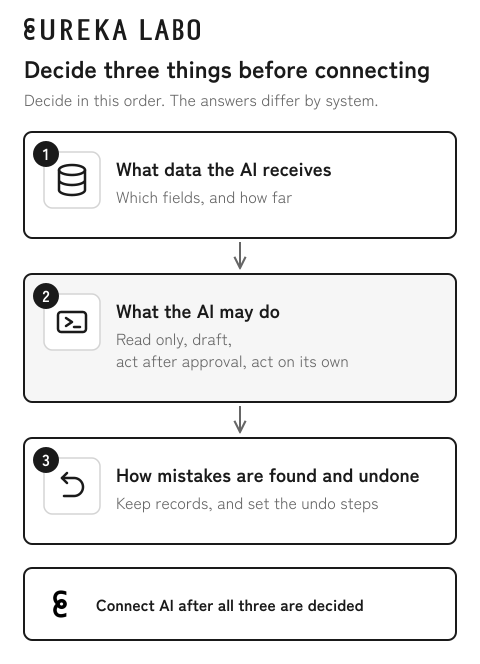
Before connecting AI to a system you already run, decide three things: (1) what data the AI receives, (2) what the AI may do, and (3) how mistakes are found and undone. Start with "read only" or "draft."
What can AI realistically do here today?
In an existing system, the realistic uses are summarizing records, sorting incoming requests, and drafting replies or record updates. AI produces a fast first draft before a person reads and decides.
Connected to tools, AI can also operate the system itself. That is where decisions are needed.
The appendix (March 31, 2026) (the latest version as of 10 November 2026) to the "AI Guidelines for Business (Ver1.2)" (English provisional translation) from Japan's Ministry of Internal Affairs and Communications (MIC) and Ministry of Economy, Trade and Industry (METI) notes these possibilities for AI agents:
- They may perform unintended actions during autonomous operation, such as ordering products or deleting files.
- While coordinating with external systems, their behavior may be illegitimately manipulated, for example through attacks that exploit vulnerabilities, resulting in internal data being unintentionally transmitted externally.
How to pick the task itself is in an earlier article, "Where should a small business start with AI? Choose the first task." This article covers the decisions before that task is connected to a system.
Three things to decide before connecting
Decide them in this order. Without the data decided, the scope of actions cannot be set. Without the scope of actions, the undo steps cannot be set.
If the table does not fit, scroll it sideways.
| Decision | What to decide | Example answer | What differs by system |
|---|---|---|---|
| 1 What data the AI receives | Which fields AI can read, and how far | Only the request text and type. No names or contact details | Personal data handled, customer contracts, where data is stored |
| 2 What the AI may do | Which actions AI can take, and at what level | Up to drafting a reply. A person sends it | The systems it connects to, how permissions work |
| 3 How mistakes are found and undone | How records are kept, and the steps to undo | Record the AI output and who adopted it | Existing record keeping, how easily data can be restored |
Think of what AI may do in four levels
The second decision is how far down these four levels AI may go. The lower the level, the larger the impact of a mistake.
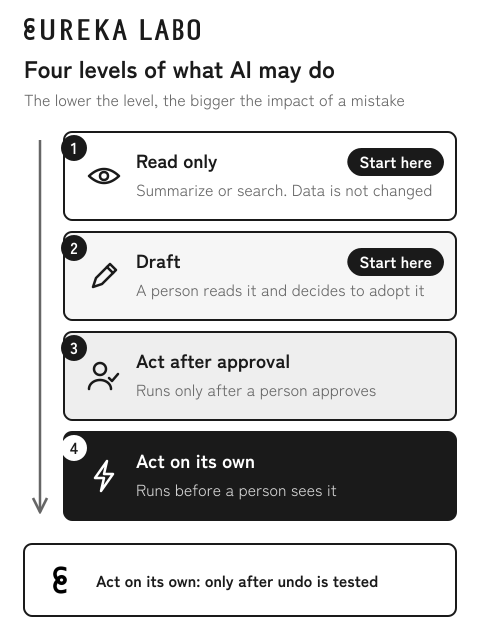
Consider "act on its own" only after the way to find and undo mistakes is decided and tested.
Where to start? Two tasks for today
Task 1: List the data fields AI will see
From the screens or tables of the system you want to connect, list the fields you want AI to see. Then remove the fields the task does not need.
If unsure about a field, leave it out for now. Adding a field later is easier than taking one away.
Task 2: Make the first feature "read only" or "draft"
Design the first feature so that AI does not change data. For example, AI drafts a reply, and a person decides whether to send it.
This way, if AI makes a mistake, a person can stop it before anything goes out.
What must a person check?
Before connecting AI, and after it starts running, check these three things:
- The data passed to AI stays within the scope you decided.
- The AI output, and who adopted it, are kept in the records.
- The undo steps have been tried once before going live.
The same appendix lists ways to prevent incidents for businesses that offer services with AI built in (AI providers). Examples include:
- Data minimization, such as deleting unnecessary data and redundant logs.
- Restricting linked tools and systems using a whitelist approach.
- A mechanism for human judgment, with matters requiring judgment organized by their level of importance.
Keep the records you need, and do not keep data or logs you do not need. Decide both up front.
The guidelines are positioned as non-binding guidance (soft law). How much of this to adopt is decided against your own system and contracts.
When the model is switched after AI is connected, the checks in "Four Things to Check Before Switching a Production App to a New AI Model" are useful.
The pitfall: connecting with the same broad permissions as an administrator
The pitfall to avoid most is giving AI the same broad permissions as an administrator, just to connect it quickly.
AI can then read data the task does not need and take actions the task does not need. When a mistake or a manipulated action happens, there is no telling how far the impact spreads.
Give AI only the permissions the task needs. Limit the tools it connects to, as well, to the ones you decided on.
From here, every system is different
The answers to the three decisions change with the systems you connect, the data you handle, and how permissions work. Approval screens, record keeping, and undo steps are built differently for each system, too.
Eureka Labo's software development, from contract development to FDE (embedded, side-by-side development), takes on requests to add AI features to a service you already run. If you want to start by sorting out which work to use AI for, you can also consult us through AI consulting.
When you contact us, please leave out confidential information and tell us the kind of system you want to connect and the work you want AI to handle. We will discuss what we can take on after reviewing the details.