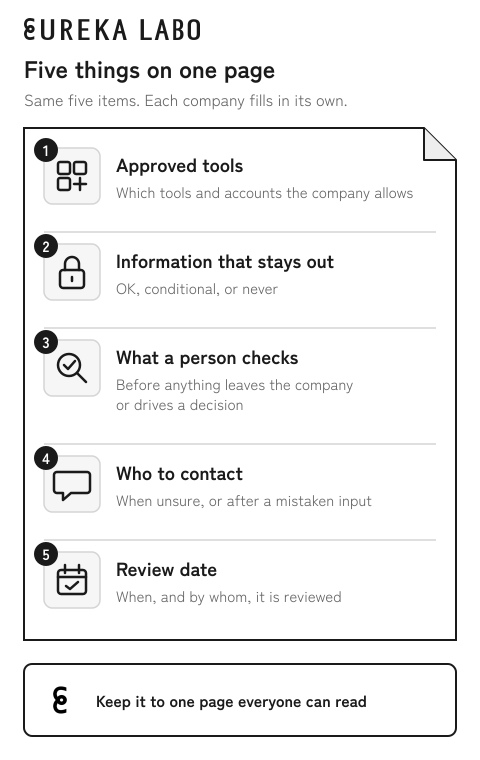
Once your staff start using AI, write a one-page rule before any long rulebook. You decide five things: (1) approved tools, (2) information that must not go in, (3) what a person checks, (4) who to contact, and (5) when you review it. Do not just list bans. Show people an approved way to use AI as well.

What can AI realistically do at work today?
For internal work, the realistic uses are drafting text, summarising long documents, translating, brainstorming, and helping with code. Each one is about producing a first draft faster.
But AI answers are not always right. They can be wrong and still sound convincing. So the core of your rules is less "what to use it for" and more "where a person stops and checks."
What goes into an AI use policy? (five items)
Put these five items on one page. The items are the same for everyone, but what you write differs by company. The right-hand column of the table shows where those differences come from.
If the table does not fit, scroll it sideways.
| Item | What to decide | What differs by company |
|---|---|---|
| 1 Approved tools | Which AI tools the company allows, and which kinds of account | Contract type, data-handling terms, tools already in use |
| 2 Information that stays out | What never goes into AI, and what may go in under conditions | Contracts with customers and partners, personal data you hold, industry rules |
| 3 What a person checks | Who checks what before anything leaves the company or drives a decision | Type of work, how much a mistake would hurt |
| 4 Who to contact | Who to ask when unsure, or after a mistaken input | How your team is organised, how many people can help |
| 5 Review date | When, and by whom, the page is reviewed | How fast your tools change, how widely AI use spreads |
Where do you start? Two tasks you can do today
Task 1: List the AI tools already in use
First, write down which AI tools are in use, by whom, and for what. Separate company contracts from personal accounts.
Decide whether to ban anything only after you see this list. You cannot draw a line around what you cannot see.
Task 2: Sort company information into three levels
Next, sort your information into "OK to use", "conditional", and "never". Put anything you are unsure about into "never" for now.
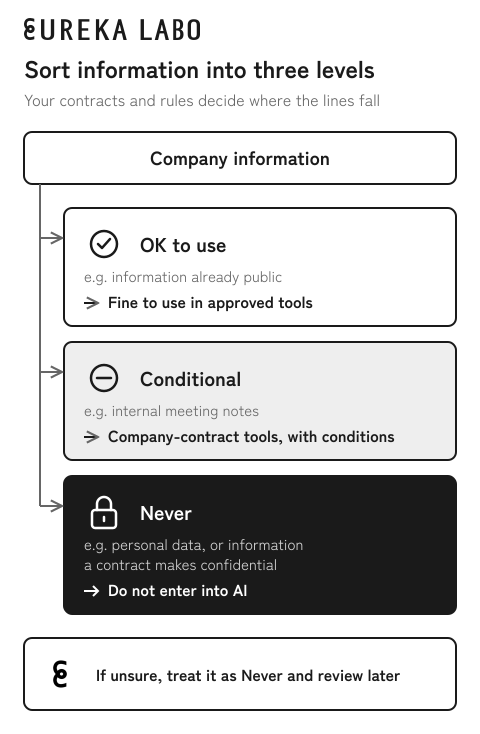
For example, text from your public website could be "OK to use", internal meeting notes "company-contract tools, with conditions", and personal data or information a contract makes confidential "never". This is only one example.
What must a person still check?
Three things should never be left to AI alone:
- A person reads any text or numbers before they leave the company.
- Before anyone starts using a tool, check its terms and how it handles data (how long inputs are kept, whether they are used for training, and so on).
- Exceptions to the rules are decided by the approver you named.
Data handling can differ even between plans or models from the same provider. The previous article gives a concrete example: "Four Things to Check Before Switching a Production App to a New AI Model."
There is also a public reference point. On 31 March 2026, Japan's Ministry of Internal Affairs and Communications and Ministry of Economy, Trade and Industry published the "AI Guidelines for Business Ver1.2" (the latest version as of 10 November 2026; English provisional translation, PDF; the official text is the Japanese version). For businesses that use AI ("AI business users"), it lists points such as taking care not to improperly input personal data or confidential information, and following the terms and instructions set by the AI provider.
The guidelines describe themselves as non-binding soft law. The ministry's guideline page also publishes a checklist and worksheet (in Japanese). They help you check your one page for gaps once you have written it.
A pitfall to watch: writing only bans, with no approved way to use AI
The pitfall to avoid most is a list of bans and nothing else.
Without approved tools or steps, people who want to work faster may turn to their personal accounts. Then the company cannot see what was entered.
So decide item 1, approved tools, first, and steer people there. If there is an environment people can use under a company contract, the rules become easier to follow.
Download the one-page template
We have prepared a one-page fill-in template for the five items. Fill in each [ ] field and blank line with your own details.
This template is a starting point for your own thinking. It is not legal advice. Check it against your own work rules, information-handling rules, and contracts with customers and partners, and consult a professional where needed.
What this template does not cover
To be clear up front, this template does not include:
- Explanations of specific laws
- Recommendations for particular AI tools
- How to design AI into your systems
Choosing the first task to try with AI is covered in "Where should a small business start with AI? Choose the first task."
When you cannot settle it in-house
How to choose approved tools, how to sort your information, and how exceptions get approved all depend on your contracts and your work. We can work this out with you, starting from the one page.
In Eureka Labo's AI consulting, we work out where and how AI actually pays off, from both the technical and the business side, and stay with you from rollout design through in-house training. If you want an AI environment or internal tools your staff can use under a company contract, you can also ask us about software development.
When you get in touch, please leave out confidential information and tell us which tools you use now and what is getting in the way. We will look at what you send and then discuss what we can help with.