Whether to build an internal tool yourselves or have it built comes down to three questions: (1) what it connects to, (2) what it has to do, and (3) how much it hurts if it stops. If all three are small, prototype it yourselves first. If any one is large, consider custom development.
To be clear up front: Euthopia, discussed in this article, is Eureka Labo's own product, an AI app builder made by the company that publishes this article. For Euthopia, this article uses only what its official site and official documentation say (checked on November 10, 2026), and does not cover pricing or plans.
What can AI realistically do here today?
An AI app builder is a tool where you can describe what you want in words and have AI build a web app. This article does not cover how to use one. It covers how to tell when one is enough and when custom development is needed.
Euthopia's official documentation lists standard web apps, such as dashboards and apps for entering and managing data (CRUD), under "What Works Best." Inside a company, that is close to things like taking requests, listing stock or equipment, and totalling daily figures.
Sign-in and permissions can be set up as well. According to the documentation, users can be split into admin, member, or view-only, and you can create roles that set read and write, table by table, to none, own rows only, or everyone's.
On the other hand, the documentation lists as a current limitation: "Custom backend logic isn't supported — apps use only Euthopia's built-in APIs." That is one of the dividing lines between building it yourselves and having it built.
If you have not yet decided which work to start using AI for, "Where should a small business start with AI? Choose the first task" helps first.
Build it yourselves or have it built: three questions
Check the three questions from the top. As soon as one comes out "large," consider custom development at that point.
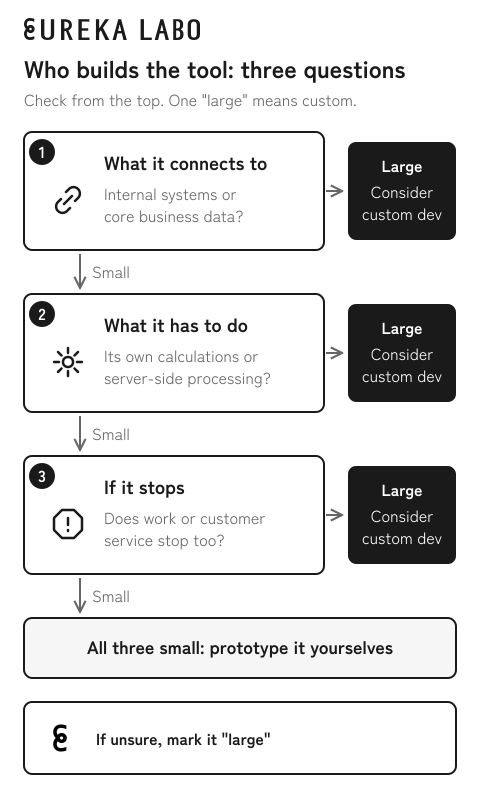
If the table does not fit, scroll it sideways.
| Question | When prototyping it yourselves fits | When to consider custom development |
|---|---|---|
| 1 What it connects to | The tool's own data is enough. Outside services only if they can be called through an API | It must connect to internal systems with no API reachable from outside, or to core business data |
| 2 What it has to do | Entering, listing, searching, and totalling are enough | It needs its own calculations, server-side processing, or complex multi-step flows |
| 3 How much it hurts if it stops | A few people use it, and work can carry on with a spreadsheet or paper | If it stops, work or customer service stops. Records must be kept for a long time |
"Can be called through an API" in the first row is based on the documentation. It says outside services, such as Slack or your own systems, are called by registering API keys under Settings → Secrets. Whether a system with no outside entry point can be connected has to be checked system by system.
Where to start? Two tasks for today
Task 1: Write the tool in three lines
Write one line each for "who uses it," "what goes in," and "what they see." For example: "five sales staff use it," "they enter clients visited and the next appointment," "they see this week's appointments as a list."
If you cannot write it in three lines, it is not yet time to build. Settle the steps on paper or in a spreadsheet first.
Task 2: Answer the three questions
With the three-line note in hand, answer each question in the table as "small" or "large." If unsure, mark it "large."
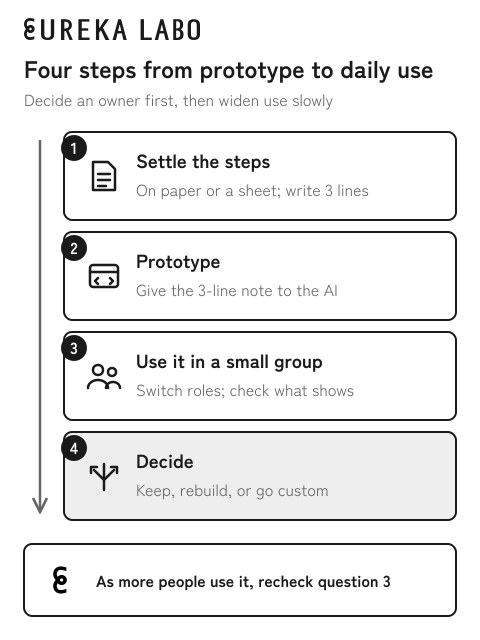
If all three are "small," start with a prototype. From prototype to keeping it in use, go through the following four steps.
What must a person check?
Even when you build it yourselves, a person checks these four things:
- Who can see what. Switch roles and test that nothing shows that should not.
- Whether the data in the tool fits company rules and contracts with customers and partners.
- Whether someone else can fix it if the person who built it leaves.
- How users are helped when stuck. For example, the documentation says that, for now, a user who signed up to a Euthopia-built app with email and password has no way to reset a forgotten password themselves.
Euthopia's documentation also describes checking that role limits work as intended with "View preview as," and restoring an earlier state from "version history." Try both once before you start using the tool.
The pitfall: tools that only the builder understands
The pitfall to avoid most is a slow build-up of tools whose insides only the person who built them knows.
When that person moves to another role or gets busy, no one is left who can fix them. Put work on a tool no one can fix, and there is nothing to fall back on when it stops.
So keep the three-line note before building, and decide who owns the tool. As more people use it, check question 3 again.
When the answer is to have it built
Connecting to internal systems, custom processing, and work that cannot stop come with different conditions at every company. We can work out with you where to draw the line between what you build and what you hand over.
Eureka Labo's software development, from contract development to FDE (embedded, side-by-side development), takes on web, mobile and backend work.
If you want to prototype it yourselves, see Euthopia's official site and its documentation. Questions about using the product or its plans can be sent through Euthopia's contact page.
When you contact us, please leave out confidential information and send the three-line note from Task 1 and the kind of system you want to connect. We will discuss what we can take on after reviewing the details.